Do you have a lot of SMS messages, some of sentimental value? Do you need to backup your SMS from your Android phone to computer? I found third party software for Android Phone to transfer SMS to your desktop computer. Here is the user’s guide (3 main Steps)
1. Download the third party software and Install it
2. Transfer the SMS from your Android to computer
3. Restore SMS from computer to Android
4. edit and delete SMS on desktop
1.Download the third party software and Install it
Step 1 Download the
Apolsoft Android SMS Transfer.zip Step 2: Unzip the file you downloaded just now, you can see Phone port and PC port, then copy the installation file " Apolsoft Android SMS Transfer.apk" from Phone port to your phone SD Card. You may need to connect your device to a desktop computer or laptop using your android phone software.
Step 3: On your device, navigate to the location of the .apk file using File Explorer. Then click.apk file to setup, only a few seconds, it will be setup sucess.
2. How to transfer and backup the SMS from android phone to computer
Step 1: After the software is ready you can find Apolsoft Android SMS Transfer.
Step 2: Select the “Apolsoft Android SMS Transfer” in your mobile programs list to run it. You will see the follow screenshot.
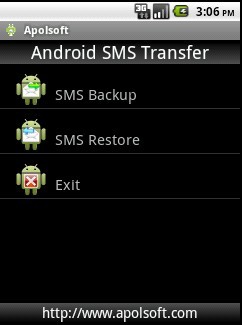
Step 3:Click menu.
Step 4:Then, Click on "Backup SMS" in the main interface to backup you SMS messages in android phone. You will see the follow screenshot.
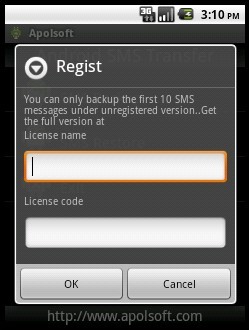
Remark:If you had buy our registered code,you can finished your registration here.If you are trying to use our software you can input registered here. (Only 10 SMS are allowed by Trial)
Click Cancel, You will see the follow screenshot.
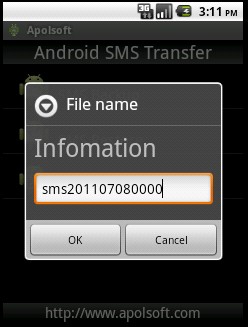
Step 5:Input your name or use the name which the software provided click OK to backup. You will see the follow screenshot.
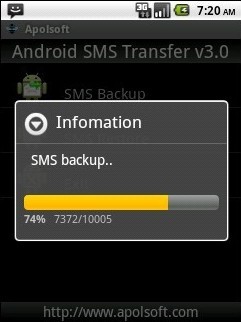
Step 6: After backup completes, all SMS can be backup to the root of the SD card(If there is no SD card then the SMS will be backup to Rom of your phone) you can use the software provided by your phone to transfer .db files to your PC.
3. Restore SMS from pc to mobile
Step 1:You can find Apolsoft Android SMS Transfer from your phone then run it.
Step 2:Again click menu, you can see:
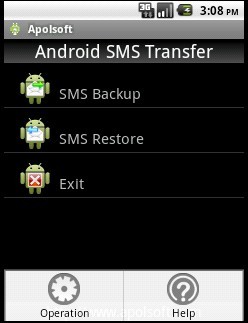
Step 3:Then, Click on "Restore SMS" in the main interface to restore SMS messages into android phone. See as below:
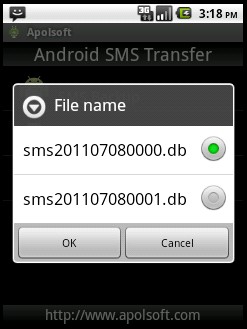
Step 3: Choose the SMS which you want to restore click “OK” you can see:
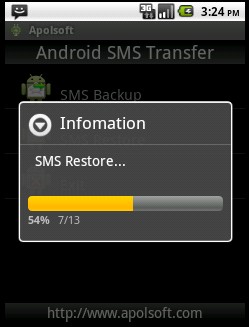
Waiting for a few seconds you can restore your SMS right now.
edit and delete SMS on desktop With Apolsoft Android SMS Transfer Manager, you could view and edit all your text messages on your computer.
.jpg)
Free download
Apolsoft Android SMS Transfer.zipmake it yours
heremore:
http://www.apolsoft.com/Enjoy it


 Konu: How to transfer your SMS from Android Mobile to PC (Okunma say�s� 30 defa)
